


Your new 4K TV has only three or four HDMI ports, yet you probably own a PS5, Xbox Series X, gaming PC, Apple TV, and a streaming box. Constantly unplugging cables damages the ports and wastes time. A 4K HDMI switcher fixes this problem completely. It is a compact box that connects multiple sources to one TV port so you can switch between devices instantly with a button or remote while keeping full 4K picture quality.
This guide explains what a 4K HDMI switcher actually is, why it has become essential in 2026, the technical features that matter most, and exactly how to choose the right model for your setup.

What Exactly Is a 4K HDMI Switcher?
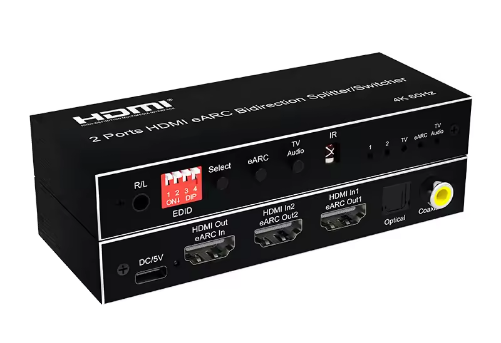
A 4K HDMI switcher is a small box with multiple HDMI inputs and a single output. You plug every device into the inputs once, run one cable from the output to your TV, and then switch sources without ever touching the cables behind the television again.
It is different from an HDMI splitter, which sends one source to several screens, and from a KVM switch, which shares keyboard and mouse between computers. The "4K" label means the switcher supports at least 4K resolution at 60Hz, while better models handle 4K at 120Hz or even 8K passthrough.
Most current units are built on HDMI 2.0 or HDMI 2.1 standards. HDMI 2.0 provides 18 Gbps bandwidth, which is enough for clean 4K at 60Hz with HDR. HDMI 2.1 raises that to 48 Gbps, unlocking higher refresh rates and advanced features without any compression or dropped frames. If the switcher does not offer true 4K support, your console may drop resolution or lose HDR colors the moment you switch.
What Exactly Is a 4K HDMI Switcher?
A 4K HDMI switcher is a small box with multiple HDMI inputs and a single output. You plug every device into the inputs once, run one cable from the output to your TV, and then switch sources without ever touching the cables behind the television again.
It is different from an HDMI splitter, which sends one source to several screens, and from a KVM switch, which shares keyboard and mouse between computers. The "4K" label means the switcher supports at least 4K resolution at 60Hz, while better models handle 4K at 120Hz or even 8K passthrough.
Most current units are built on HDMI 2.0 or HDMI 2.1 standards. HDMI 2.0 provides 18 Gbps bandwidth, which is enough for clean 4K at 60Hz with HDR. HDMI 2.1 raises that to 48 Gbps, unlocking higher refresh rates and advanced features without any compression or dropped frames. If the switcher does not offer true 4K support, your console may drop resolution or lose HDR colors the moment you switch.
Why Do You Need a 4K HDMI Switcher in 2026?
Even the latest premium TVs from Sony, LG, and Samsung usually come with only three or four HDMI ports, and one of those is typically reserved for eARC to connect a soundbar.
Most people today run five or more devices at the same time. Without a switcher you either spend hundreds of dollars more on a TV with extra ports or keep crawling behind the set to swap cables, which eventually bends pins and causes connection problems.
A quality 4K HDMI switcher solves every one of these frustrations. It lets you change sources in under two seconds without moving furniture. It costs between 25 and 80 dollars instead of adding three hundred or more to the price of a new television. For gaming it adds less than one millisecond of delay, so 120Hz performance on PS5 or Xbox stays exactly the same. It passes the full original signal through, preserving HDR10, Dolby Vision, and 10-bit color with no loss or washed-out tones. Many 2026 models also support 8K at 60Hz, making them ready for your next TV upgrade.
Gamers especially benefit because variable refresh rate eliminates screen tearing and auto low latency mode instantly puts the television into game mode. Home-theater users enjoy tidy cable management and perfect Dolby Atmos audio return through eARC without extra wires.

Critical Features to Look for in the Best 4K HDMI Switcher
The technical details decide whether a switcher works perfectly or disappoints you later.
HDMI Version and Bandwidth
HDMI 2.0 is the absolute minimum for reliable 4K at 60Hz, but anyone with a PS5, Xbox Series X, or high-refresh PC should choose HDMI 2.1 because its 48 Gbps capacity supports 4K at 120Hz, variable refresh rate, auto low latency mode, and full Dolby Vision without forcing anything down.
Port Count and Resolution Support
Port count matters next. A four-input model covers most households, while five-input or eight-input versions are better if you own six or more devices. Resolution and refresh rate support must include 4K at 120Hz along with variable refresh rate and auto low latency mode so the picture stays smooth and the television automatically enters low-lag mode when a console powers on.
HDR, Audio, and Switching Methods
HDR and audio compatibility is equally important. The switcher needs to handle HDR10, HDR10+, Dolby Vision, and hybrid log gamma completely, and it must pass eARC so your soundbar receives Dolby Atmos without additional cables. Switching methods range from a simple button on the box to an infrared remote, automatic detection that changes sources when a device turns on, or even phone app control on the newest models. The most convenient combination is remote plus auto-detection.
Other essential details include EDID management that automatically tells your devices exactly what resolution and HDR format your TV can handle, automatic power-off when no signal is present, an external power adapter for stable performance, a metal case with good ventilation to prevent overheating during long sessions, and at least a one-year warranty.
Here is a clear comparison of the two main HDMI standards used in 2026 switchers:
|
Feature |
HDMI 2.0 |
HDMI 2.1 |
|
Bandwidth |
18 Gbps |
48 Gbps |
|
Maximum Resolution |
4K@60Hz |
4K@120Hz and 8K@60Hz |
|
VRR Support |
No |
Yes |
|
ALLM Support |
No |
Yes |
|
Dolby Vision |
Limited |
Full passthrough |
|
Audio Return |
Basic ARC |
Full eARC with Dolby Atmos |
How to Choose the Right 4K HDMI Switcher for Your Specific Setup
Choosing the correct model takes only a few minutes once you follow a simple process.
First decide whether gaming or movies and streaming are your main activities. Gaming setups with PS5 or PC need HDMI 2.1 plus variable refresh rate and auto low latency mode, while movie-focused users can stay with HDMI 2.0 and strong HDR support.
Step 2–5: Budget, Compatibility, Reviews and Placement
Next set a realistic budget. Then check that your TV ports and devices are compatible with the required HDMI version and that your soundbar will work with eARC if you use one. Read actual user reviews that mention specific performance like "PS5 120Hz no lag" or "Dolby Vision works perfectly" rather than relying only on star ratings. Finally consider where the switcher will sit and make sure you have short, certified high-speed HDMI cables no longer than three meters for full 4K at 120Hz performance.
This quick guide shows the best options by budget and use case:
|
Budget Range |
Recommended Type |
Ideal For |
Included Features |
|
Under $30 |
4×1 HDMI 2.0 |
Basic 4K@60Hz streaming |
Remote and basic HDR |
|
$40–$60 |
5×1 HDMI 2.1 |
Gaming plus multiple devices |
VRR, ALLM, auto-switching |
|
$70 and up |
8×1 HDMI 2.1 premium |
Advanced home theater setups |
App control, 8K-ready, full eARC |
Most people find the middle $40–$60 range with a five-input HDMI 2.1 model delivers the perfect balance for both gaming and daily use.
Easy Step-by-Step Setup Guide
Setting up the switcher is quick and straightforward. Connect each device to the input ports, run one HDMI cable from the output to your television, and power the unit on. Pair the remote if it is included. On the TV, change the selected HDMI input to enhanced or HDMI 2.1 mode. Enable 4K, HDR, and variable refresh rate on your consoles. Test every source by playing a 4K HDR game or movie and switching between them. For best results always use certified high-speed cables no longer than three meters and update the firmware through USB if the manufacturer provides a newer version.
Troubleshooting Common Issues
Most problems are easy to fix in seconds. No signal usually means the power adapter or cable is loose. Flickering or a sudden drop in resolution is often solved by changing the EDID mode or using a shorter cable. If the remote stops working, replace the batteries and make sure nothing blocks the line of sight. HDMI-CEC conflicts that cause devices to turn each other on and off disappear when you disable CEC on one or two devices in the settings menu.
Conclusion & Final Recommendations
A good 4K HDMI switcher removes all the cable swapping, keeps your picture perfect, and makes daily use far more convenient. Whether you play at 120Hz or watch Dolby Vision movies, the right model pays for itself immediately. Visit zaost.com0 today to see the latest 2026 models we have tested and stocked. Choose one that matches the features above, plug it in, and start enjoying seamless switching right away.
Frequently Asked Questions
1. What is the difference between an HDMI switcher and an HDMI splitter?
A switcher connects multiple devices to one TV port so you can switch between them. A splitter takes one device and sends the signal to multiple displays.
2. Do I need HDMI 2.1 if I have a PS5 or Xbox Series X?
Yes, HDMI 2.1 is recommended. It supports 4K at 120Hz, VRR, ALLM, and full Dolby Vision, while HDMI 2.0 is limited to 4K@60Hz.
3. Will a 4K HDMI switcher add input lag for gaming?
No. Good 4K HDMI switchers add almost zero lag (under 1ms) and fully preserve 120Hz, VRR, and HDR performance.
4. How many inputs should I choose?
Most users should choose a 4 or 5-input model. Go for 5+ inputs if you have more than four devices (PS5, Xbox, PC, streaming boxes, etc.).


