
Frustrated with camera switching freezes, audio sync issues, or dropped frames during live streams? An HD live streaming switcher fixes it instantly. This compact all-in-one device powers professional multi-camera setups, letting you cut, mix, and stream crystal-clear video to YouTube, Facebook, or TikTok in real time-no laptop juggling needed.
In 2026, it's the go-to tool for creators, churches, corporate teams, and educators who want broadcast-quality results without a full TV truck. You get 1080p (often 4K pass-through), zero-latency switching, and separate ISO recordings for easy editing.
This guide covers what an HD live streaming switcher does, why it beats software-only tools, must-have 2026 features, how to choose the right model, simple setup steps, current comparisons, and real-world use cases. By the end, you'll know exactly why one smart purchase turns your streams pro.
What Is an HD Live Streaming Switcher and How Does It Work?
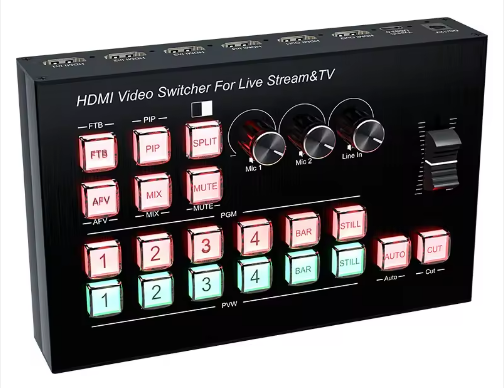
Think of an HD live streaming switcher as a miniature TV studio control room in a single box. It takes video feeds from multiple cameras (or computers, PTZ units, even phones via capture cards), processes them in real time, lets you choose which shot goes to air, adds graphics or effects, and then sends the final program feed out for streaming or recording.
Core Components: Inputs, Outputs, and Processing Engine
At the front you have inputs-usually four or eight HDMI or SDI ports. HDMI is familiar and cheap; it carries both video and audio on one cable but struggles beyond 15–50 feet. SDI, the pro standard, runs cleanly for hundreds of feet and locks the signal so tightly that even long cable runs stay rock-solid. Newer high-end units also support NDI, which sends HD video over ordinary Ethernet cables with almost no extra hardware.
Inside sits the processing engine-a dedicated chip that mixes sources at full frame rate without taxing your computer. Outputs include a "program" feed (what the audience sees), a multiview monitor port (so you see every camera plus the live mix on one screen), streaming ports, and often a USB-C webcam output that turns the entire switcher into a virtual camera for OBS or Zoom. The magic happens in hardware, not software, so everything stays buttery smooth even during complex transitions.
Real-Time Switching vs. Software-Only Solutions
Software like OBS or vMix can switch cameras, sure-but your CPU does all the work, latency creeps in, and one bad plugin can crash the stream. A hardware HD live streaming switcher keeps everything under 1–2 frames of delay (under 33 ms at 60 fps). You tap a button and the cut is instant; the audience never sees a glitch. Plus, you get true ISO recording-each camera saved as its own clean file-something most software setups still struggle to deliver reliably.
Key Benefits of Using an HD Live Streaming Switcher for Creators and Broadcasters
The real power shows up once you start using one daily. Here's what actually moves the needle.
Crystal-Clear HD/4K Quality and Zero-Latency Switching
Modern switchers lock at 1080p60 with 10-bit color and broadcast-grade compression. When you switch cameras there's no stutter, no frame drop, and no lip-sync issues. Viewers on mobile or big screens both see the same sharp picture because the switcher handles scaling and encoding in hardware.
Multi-Platform Streaming & ISO Recording in One Device
Push the same live program to YouTube, Facebook, and a custom RTMP server at the same time. While streaming, the device quietly records every input plus the final program as separate MP4 files on a USB drive or SSD. Post-show, you can pull the hero camera ISO for highlights or the wide shot for b-roll without re-editing the whole stream. Creators who once needed three laptops now do it with one box.
Cost and Time Savings Compared to Traditional Setups
A full traditional setup-cameras, capture cards, a powerful PC, and separate streaming encoders-easily tops $2,000–$3,000 and takes hours to configure. A solid HD live streaming switcher starts around $300 and does 80 % of the work out of the box. Setup time drops from an afternoon to 15 minutes.
Must-Have Features in the Best HD Live Streaming Switcher in 2026
Not every switcher is created equal. These features separate weekend warriors from polished productions.
HDMI/SDI/NDI Inputs and Multi-View Monitoring
Look for at least four inputs. The best units mix HDMI and SDI on the same chassis and add NDI for wireless camera freedom. The multiview output is non-negotiable-you see all cameras, the program, and a preview on one monitor so you never guess what's coming next.
Built-in Effects, PIP, Transitions, and Chroma Key
Professional models give you fade, wipe, and dip-to-black transitions, picture-in-picture layouts, and a full chroma keyer for green-screen virtual sets. The Extreme series even adds "SuperSource"-a second layer that lets you build complex graphics without an external computer.
RTMP Streaming to 3+ Platforms + USB-C Webcam Output
Enter your stream keys once and go live everywhere. Many 2026 models also appear as a single 1080p webcam over USB-C, so you can still use OBS for extra overlays while the switcher handles the heavy lifting.
Here's a quick connectivity comparison that shows why the choice matters:
|
Connection Type |
Max Cable Length |
Latency |
Best For |
Drawback |
|
HDMI |
15–50 ft |
<1 frame |
Short runs, budget setups |
Signal drops over distance |
|
SDI |
300+ ft |
<1 frame |
Long runs, pro events |
Higher cable cost |
|
NDI |
Network-wide |
1–2 frames |
Easy cabling, PTZ cams |
Needs stable Gigabit LAN |
How to Choose the Right HD Live Streaming Switcher for Your Needs

Ask yourself three questions: How many cameras? How far do cables run? What's my budget?
Budget, Input Count, and Portability Checklist
Under $400: Entry-level 4-input HDMI models with basic streaming. $600–$900: 8-input units with ISO recording and NDI. Over $1,200: Rack-mount or 4K-capable beasts for permanent installs. Portability still matters-most creators love the palm-sized ATEM Mini form factor that fits in a backpack.
NDI vs. SDI: Which Connectivity Fits Your Workflow?
If your cameras are in the same room and you hate running thick cables, NDI wins: one Ethernet cable per camera, discoverable on the network, and surprisingly low latency on a modern switch. For outdoor stages or venues where Wi-Fi is unreliable, SDI is still king-plug-and-play reliability that never drops.
Beginner-Friendly vs. Pro-Level Models
Beginners want one-button streaming and auto audio mixing. Pros need multiple mix-effect buses, advanced keyers, and remote control via iPad or software. The sweet spot for most people in 2026 sits in the mid-range models that give you pro features without a steep learning curve.
Step-by-Step Setup Guide for Your HD Live Streaming Switcher
Don't worry-this takes less time than setting up a new phone.
Hardware Connections and Multi-View Configuration
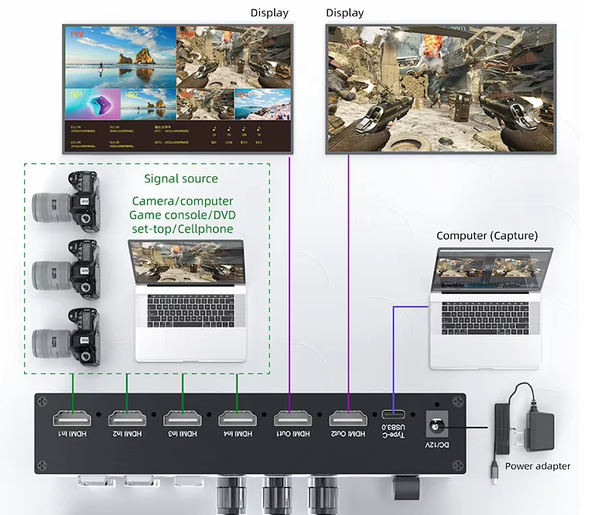
1.Plug in power.
2.Connect cameras to input 1–4 (match resolution-1080p60 everywhere is safest).
3.Run an HDMI cable from the multiview output to your monitor.
4.Connect the program output to your streaming encoder or directly to the built-in stream engine.
5.For audio, either embed it from cameras or plug a mixer into the switcher's audio input.
The multiview screen usually lights up automatically showing all sources side-by-side.
Streaming Settings for YouTube, Facebook & Custom RTMP
Go into the settings menu, select "Streaming," pick YouTube or Facebook from the list, paste your stream key, and hit "Start." Most units let you add two or three destinations at once. For custom RTMP (like LinkedIn or a private CDN), just enter the server URL and key manually. Test with a 30-second private stream first-always.
Quick Troubleshooting Tips for Common Issues
No picture on one input? Double-check resolution and cable type. Stream drops? Lower bitrate to 6000 kbps for safety. Audio out of sync? Force 48 kHz sample rate in the menu. NDI lag? Make sure your network switch is Gigabit and not shared with heavy downloads.
Top HD Live Streaming Switchers Compared (2026 Edition)
Here's how the market actually stacks up right now:
|
Model |
Inputs |
Max Resolution |
NDI Support |
Multi-Platform Streaming |
ISO Recording |
Approx. Price (USD) |
Best For |
|
ATEM Mini Pro |
4 HDMI |
1080p60 |
No |
Up to 2 platforms |
Yes |
$295–$450 |
Beginners & small churches |
|
ATEM Mini Extreme ISO G2 |
4 HDMI + SuperSource |
1080p60 |
Yes |
3+ platforms + USB webcam |
Yes (8 tracks) |
$995–$1,295 |
Serious creators & events |
|
ATEM SDI Extreme ISO |
8 SDI |
1080p60 |
Optional |
3+ platforms |
Yes |
$1,495+ |
Long-cable pro installs |
|
YoloBox Extreme (portable) |
8 HDMI/NDI |
4K pass-through |
Yes |
Dual H/V streaming |
Yes |
$800–$1,100 |
Mobile & hybrid events |
The Extreme ISO G2 wins for most people in 2026 because it added Thunderbolt graphics input and a redesigned control panel while keeping the familiar workflow.
Real-World Use Cases: Who Needs an HD Live Streaming Switcher Most?
Churches use them to switch between pulpit, choir, and congregation cams while streaming to both Facebook and their website-ISO recordings later become sermon reels. Gamers combine facecam, gameplay capture, and overlays with zero lag. Corporate teams run hybrid town halls with remote speakers via NDI. Universities record lectures live and give students clean ISO files for review. In every case, the HD live streaming switcher turns chaotic multi-cam chaos into smooth, watchable television.
Conclusion
An HD live streaming switcher is the single upgrade that removes the biggest headaches from multi-camera live production. It delivers pro-quality video, instant switching, multi-platform streaming, and perfect ISO recordings in one reliable box.
It pays for itself fast through saved time and better viewer experience. Ready to go pro? Visit zaost.com0 to explore the latest models, compare specs, and find the perfect fit for your budget and workflow. Your audience will notice the difference immediately.
FAQ
1.Q: Do I need a powerful computer to run an HD live streaming switcher?
A: No. The switcher processes everything in dedicated hardware, so you don't need a high-end PC.
2.Q: What is ISO recording and why does it matter?
A: It records each camera feed separately as clean files, making post-production and highlight creation much easier.
3.Q: Can one switcher stream to multiple platforms at once?
A: Yes. Most 2026 models support simultaneous streaming to YouTube, Facebook, and custom RTMP servers.
4.Q: How beginner-friendly are these switchers?
A: Very. Setup usually takes only 15 minutes, with intuitive controls and one-button streaming on many models.


